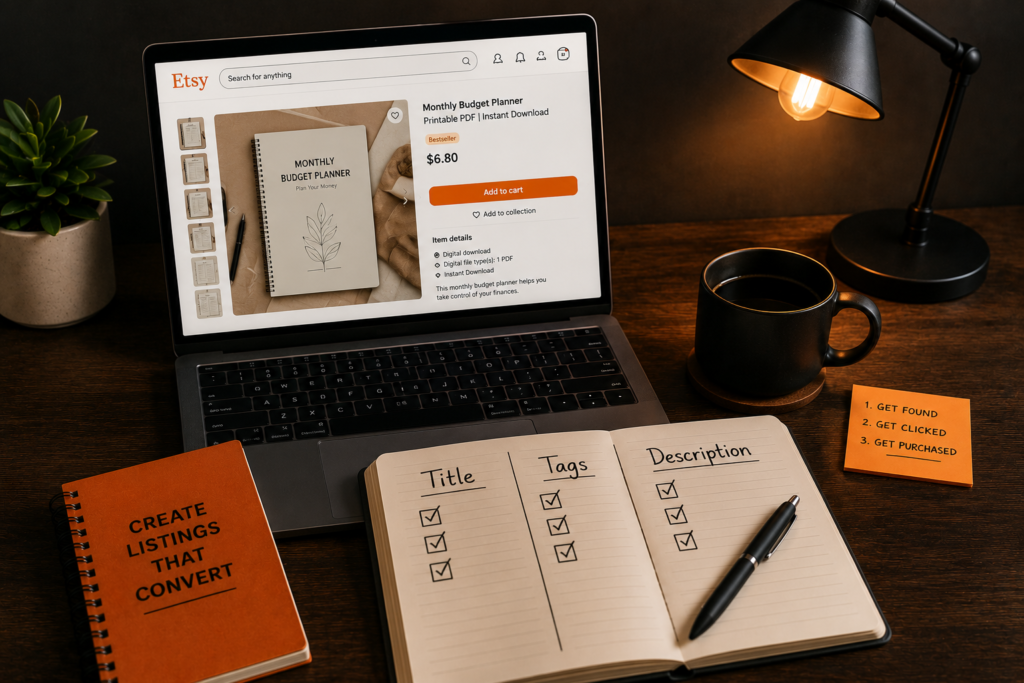
How to write an Etsy listing for digital products is a question most sellers answer the wrong way — they treat it like a form to fill out.
Title field? Type something. Tags? Add some words. Description? Write a paragraph.
Then they publish, wait, and wonder why nothing sells.
Here is what I figured out after going through dozens of listings that were getting views but no sales: the listing was not the problem. The thinking behind the listing was.
A listing does not have one job. It has three.
First, it has to get found — by the right buyer, searching the right term. Second, it has to earn the click — because showing up in search means nothing if the buyer scrolls past. Third, it has to convince the buyer to actually purchase — because a click is not a sale.
Most sellers only think about job one. The other two are where the sales actually happen or don’t.
Think of it like a physical shop on a busy street. The title and tags are the storefront sign — they help people find the shop. The thumbnail is the shop window — it convinces them to walk inside. And everything on the listing page (your description, mockups, pricing, reviews) is what convinces them to buy once they are in.
By the end of this article you will know which of those three jobs your listing is failing at — and exactly what to fix.
Table of Contents
The Mistake Most New Sellers Make
When a listing is not selling, the instinct is to assume nobody is finding it.
So the fix becomes: add more keywords. Stuff the title. Tweak the tags. Start over with a new listing entirely.
Sometimes that is the right fix. But often it is not the problem at all.
The real issue is that most sellers have one mental model for their entire listing — get found — when they actually need three completely different mental models working at the same time.
Getting found is a title and tags problem. Getting clicked is a thumbnail problem. Getting purchased is a trust and clarity problem.
These are not the same problem. They do not have the same fix. And treating them as one thing is why sellers spend months tweaking keywords on a listing that was never going to convert anyway — because the thumbnail was losing buyers before they ever reached the description.
The rest of this article walks through each job separately. Figure out which one your listing is failing at first. Then fix that one thing.
Job 1 — How to Write an Etsy Listing Title That Gets Found
Most of the advice you will find about Etsy listing titles is outdated.
The approach that spread across every blog and YouTube channel went like this: fill all 140 characters, separate keywords with pipes or commas, cram in as many search terms as possible. The idea was that more keywords in the title meant more chances to show up in search.
Etsy updated its official title guidance in 2025 and 2026, moving away from that approach entirely. The new guidance is clear: write for the buyer first, not the search engine. State what the product is upfront. Make it readable.
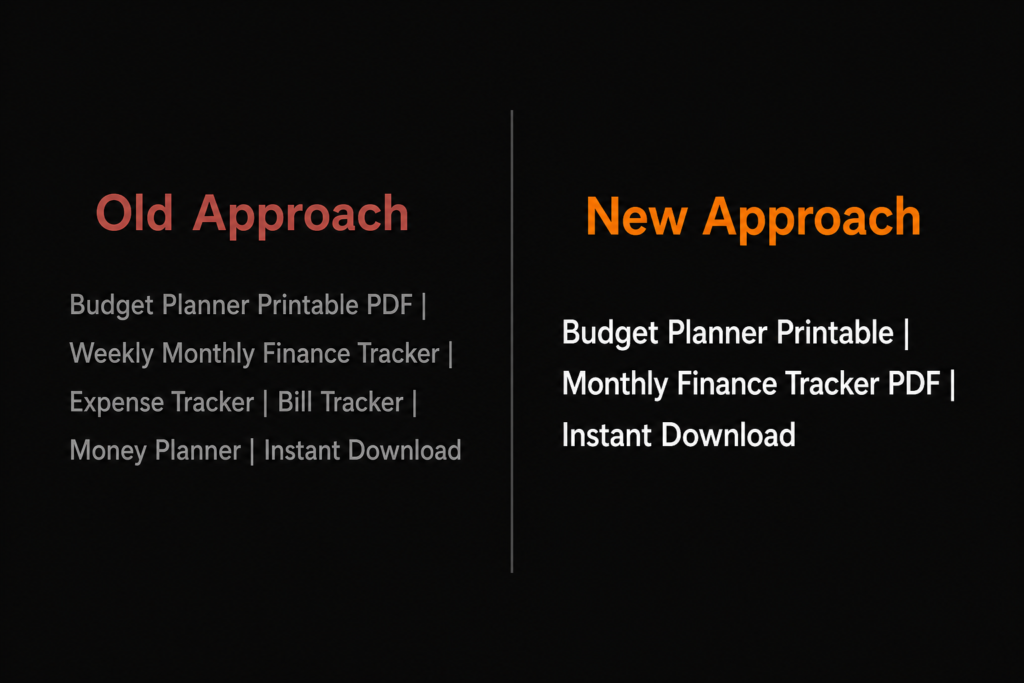
Here is why that shift happened. When buyers search on Etsy and see a result that reads like “Budget Planner Printable PDF Weekly Monthly Finance Tracker Expense Bill Money Planner Instant Download Digital,” most of them scroll past it. It does not read like a product — it reads like a list of search terms. And when enough buyers scroll past a listing without clicking, Etsy takes that as a signal that the listing is not what buyers are looking for, and shows it to fewer people over time.
A cleaner title gets more clicks. More clicks tells Etsy the listing is worth showing. It compounds.
Here is what that looks like in practice. Old approach: “Budget Planner Printable PDF | Weekly Monthly Finance Tracker | Expense Tracker | Bill Tracker | Money Planner | Instant Download.” New approach: “Budget Planner Printable | Monthly Finance Tracker PDF | Instant Download.” Same product. Half the words. Twice as readable.
For digital products specifically, include the file format (PDF, Canva, Google Sheets) and the use case early — within the first 40 characters if possible. That is all most buyers see on mobile before deciding whether to click.
On tags: you have 13 slots, 20 characters each. Most sellers use fewer than nine. Every empty tag is a search you will never show up in. Fill all 13, use multi-word phrases instead of single words, and make sure your tags cover different angles than your title — use cases, occasions, audiences, file formats. Your title and tags should work as partners, not say the same thing twice.
Self-check: open your Etsy Shop Manager and look at your impressions. If impressions are low, Job 1 is your problem. If impressions look healthy, move to Job 2.
Job 2 — Get Clicked (The Thumbnail)
Here is something almost every Etsy guide gets wrong by omission: they spend the majority of their time on keywords and barely mention thumbnails.
That is backwards.
Getting found is meaningless if nobody clicks. And for digital products especially, the thumbnail is doing an enormous amount of work — it has to convince a buyer to choose your listing over everything else on the page, in a split second, before they have read a single word of your title.
Here is what that looks like in numbers. A listing getting 1,000 impressions a month at a 3% click-through rate gets 30 clicks. The same listing with a 5% click-through rate gets 50 clicks. That is 67% more traffic with zero other changes. No new listings. No SEO work. Just a better first image.
Most digital product sellers use a flat screenshot of their file as the first image. A screenshot of a spreadsheet or a PDF page on a white background does not make a buyer want to click. It just shows them what the file looks like.
What earns the click is context. Show the product being used. A budget planner printed and sitting on a desk next to a coffee cup. A Canva template open on a laptop. A digital planner displayed on an iPad. That lifestyle context answers the buyer’s first subconscious question — can I picture myself using this — before they have even read the title.
For digital products, the image slot order matters. Slot 1 should be a lifestyle mockup showing the product in use. Slot 2 should be the actual file preview so buyers know exactly what they are downloading. Slots 3 through 5 can cover what is included, a close-up of the design, and any alternate versions.
One more thing most sellers skip: video. Listings with a short video get twice as many orders as listings with photos only. Under 28% of sellers add one. For a digital product, a 15-second screen recording showing someone opening the file and scrolling through it is enough. It is one of the easiest ways to stand out on a page full of static images.
Self-check: if your impressions are healthy but your clicks are low, Job 2 is your problem. Your thumbnail is not earning the click. Start there before touching anything else.
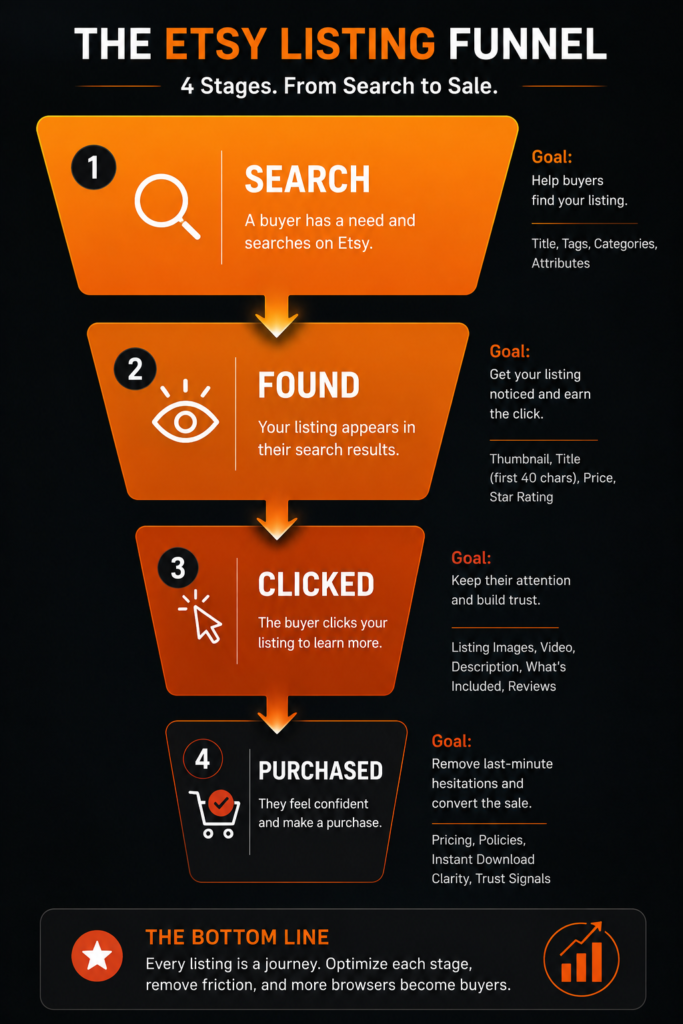
Most listings lose buyers between Found and Clicked. That is where Job 2 happens.
Job 3 — Convince the Buyer (Description, Trust, and Everything Else)
Most sellers think Job 3 is just about writing a good description.
It is not. The description is one part of it. But by the time a buyer reaches your listing page, they are making a decision based on everything they see — your images, your price, your reviews, your video, how clearly you have explained what they are actually getting.
The description matters. But it is one piece of a larger question the buyer is asking: can I trust that this is exactly what I need?
Here is something almost nobody tells digital product sellers about their description. The first 160 characters of your listing description show up as the meta description when your listing appears in Google search results. Etsy listings rank on Google too — and those 160 characters are your one chance to earn a click from Google before the buyer even reaches Etsy.
Most sellers either leave this to chance or paste their title in as the first line. Neither works.
Write the first sentence of your description like it is a Google ad for your product. Clear, specific, and written for the buyer who is about to click. Something like: “This printable budget planner helps you track monthly expenses, bills, and savings goals — available as an instant PDF download, no subscription needed.”
Beyond that first sentence, your description needs to answer five questions every digital product buyer is asking:
What exactly is it? What format is the file? How do they get it after purchasing? What software do they need to open or edit it? Are there any restrictions on how they can use it?
If any of those five questions go unanswered, some buyers will leave rather than ask. And a buyer who leaves to ask a question rarely comes back.
Always include a clear line stating this is a digital product: “This is an instant digital download — no physical item will be shipped.” It sounds obvious. But confusion about this is one of the most common reasons digital product listings get negative reviews from otherwise happy customers.
Write for mobile. Most Etsy purchases happen on a phone. Long unbroken paragraphs get skipped. Short lines, clear sections, white space between ideas.
If you are getting clicks but not sales, pricing is also worth checking before you rewrite the whole description. A listing with the right title, the right thumbnail, and a clear description can still fail if the price does not match what the buyer expects for that type of product.
Self-check: if your impressions are healthy and your clicks are reasonable but sales are not coming, Job 3 is your problem. Start with your first 160 description characters and the five questions above.
The One Thing That Connects All Three Jobs
There is a reason some listings nail all three jobs without much effort, and others struggle with all three at once.
It comes down to how well the listing matches what the buyer actually came looking for.
A buyer searching “weekly budget planner printable” has a very specific thing in mind. If they click a listing and find a yearly financial planning spreadsheet — even a beautifully designed one — they will leave without buying. Not because the product is bad. Because it was not what they were looking for.
That mismatch can happen at any stage. A title that attracts the wrong buyer gets clicks that never convert. A thumbnail that looks like a business template draws in a different audience than the one searching for a personal finance planner. A description that buries the key details loses buyers who needed that information to feel confident buying.
Every part of the listing — title, tags, thumbnail, description, price — needs to be aimed at the same buyer, answering the same question, creating the same expectation of what they are about to receive.
This is why niche research is not something you do before listing and then forget. The keywords you confirmed people were actually searching for are the same keywords that belong in your title. The buyer you identified is the same person your thumbnail should be speaking to. The use case you validated is the same one your description should be explaining.
If your listing is struggling across all three jobs at once, the problem is usually not the listing itself. It is that the product was never confirmed to match what buyers are searching for in the first place.
Frequently Asked Questions
Should my Etsy listing title be all keywords?
No — and this is one of the biggest shifts in Etsy’s recent guidance. Titles used to be treated as pure keyword real estate. Now the whole listing is taken into account, which means your title can focus on clarity and readability while your tags handle keyword diversity. A title that reads naturally tends to earn more clicks from search results — and buyers clicking more often is what tells Etsy the listing is a good result worth showing to more people.
How many of the 13 tags should I use?
All 13. Every empty tag is a missed chance to show up in a buyer’s search. Most sellers use fewer than nine, leaving several potential entry points completely unused. Fill them with multi-word phrases — ‘printable budget planner’ matches far more specific buyer searches than ‘planner’ alone. Make sure your tags cover different angles than your title: use cases, occasions, audiences, file formats.
Does my description help with Etsy search ranking?
Indirectly, yes. Your description does not directly determine where Etsy shows your listing — but it heavily affects whether buyers who find it actually purchase it. And buyers purchasing more often is what tells Etsy the listing deserves more visibility. The other thing most digital product sellers miss: your first 160 description characters show up as the meta description when your listing appears in Google search results. Those 160 characters are your one chance at a Google click.
What images do I need for a digital product listing?
At minimum: a lifestyle mockup showing the product in use as your first image, and a file preview showing exactly what downloads as your second. Beyond that, fill as many slots as you can. A what-is-included breakdown, a close-up of the design, and an alternate view all reduce the buyer’s uncertainty about what they are getting. For digital products specifically, every extra image answers a question a buyer might otherwise leave with unanswered — and a buyer with an unanswered question usually does not buy.
Final Thoughts
A listing is not done when it is published. It is done when all three jobs are working.
The sign is up and the right buyers are finding it. The window is dressed and they are walking inside. And everything on the page convinces them to buy.
Most sellers publish and move on to the next listing before any of those three jobs are actually working. Then they wonder why adding more listings is not moving the needle.
The sellers who climb out of the bottom tier — the ones moving from a handful of views and no sales to consistent monthly income — are almost always the ones who go back and fix the listing that was not working rather than just adding another one that has the same problems.
If you are not sure where your listing is failing, start with the self-checks from each section. Low impressions means Job 1 needs work. Impressions but no clicks means Job 2 is the problem. Clicks but no sales means Job 3 is where buyers are dropping off.
Fix one job at a time. It is slower than rewriting everything at once, but you will actually know what worked.
The income gap between the 65% of Etsy sellers earning under $100 a month and the 18% earning $100 to $2,000 often comes down to exactly this — not how many listings they have, but how well each listing is doing all three jobs. How much can you make selling digital products on Etsy breaks that gap down further if you want the full picture.
Pingback: Is Selling Digital Products on Etsy Profitable? (2026 Data)