Sunday night, you open your bank account to do a quick tally before the week starts. There’s a deposit from Etsy — smaller than you expected. A freelance payment from a client, sitting a few lines down, paid days after you actually finished the work. Maybe a Venmo transfer from something you resold on the side.
Three deposits, three different days, three different amounts. And after a minute of squinting at the screen, you realize you can’t actually answer a simple question: which one of these hustles is worth your time?
This is the moment a single-hustle tracking system starts to fall apart. Not because you’re bad at spreadsheets — because nobody built one column to hold two completely different kinds of money at once.
If you’ve been trying to track income from multiple side hustles using the same simple system that worked fine with one, you’ve probably noticed the numbers stopped adding up around the time the second hustle showed up. Here’s why that happens, and the small change that fixes it without adding real complexity.
Table of Contents
Why Your Tracking System Breaks the Moment You Add a Second Hustle
When you had one side hustle, tracking felt almost too simple to bother writing down. One income column, one expense column, a quick glance at the total every few weeks. It worked because there was only one kind of money to keep straight.
Then a second hustle showed up — maybe a freelance gig alongside your Etsy shop — and the same system started lying to you. Not on purpose. It just was never built to hold two different kinds of money at once.
Here’s the part that’s easy to miss: platforms and clients don’t pay you the same way. Etsy deducts its fees automatically before a payout ever reaches your bank, and that payout can take a week or two to arrive. A freelance client, on the other hand, usually pays the full invoice amount, on their own schedule, with nothing taken out. Mix those two together in one flat column and neither number means what you think it means.
Picture a $180 Etsy sale — right in the range we broke down in how much you can actually make selling digital products on Etsy. By the time fees come out, it lands in your bank as $142.50 — and it might not show up for several days. Compare that to a $500 freelance invoice, which lands as the full $500, often the same week it’s sent. Logged side by side in one column, those two numbers look like they’re telling you the same story. They’re not even measuring the same thing.
The problem was never the math. It was mixing two different kinds of money into one column — which is exactly what makes it impossible to tell which hustle is actually pulling its weight. If you’ve already got the same five-column system from tracking a single side hustle up and running, the good news is you don’t need to rebuild it. You just need to give each hustle its own lane.
How to Track Income From Multiple Side Hustles: The One-Tab-Per-Hustle System
If you’ve been using a single Google Sheet with one income column and one expense column, the fix here isn’t to throw that out and start over. It’s smaller than that.
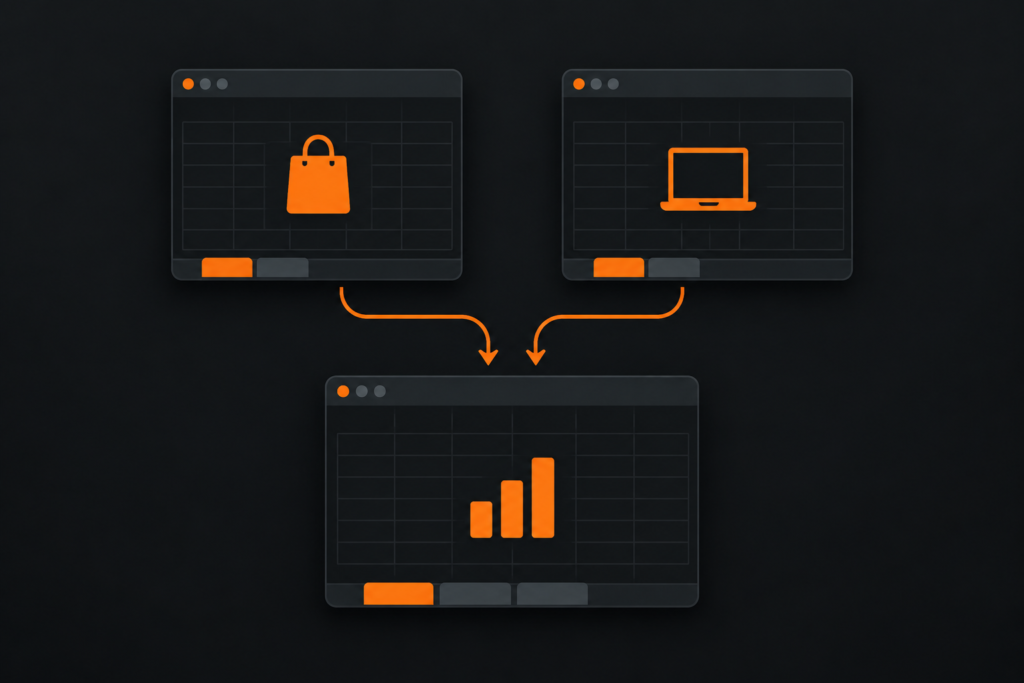
Keep the same five columns you already know: Date, Description, Income, Expense, Notes. The only change is where they live. Instead of one shared tab for everything, give each hustle its own tab — one for Etsy, one for freelance work, one for anything else you’ve got going. Same columns, same habit, just separated.
Then add one more tab: Summary. This is the only tab that combines anything. Each hustle’s tab keeps its own running total, and the Summary tab pulls those totals together in one place, so you’re never scrolling through a mixed list trying to remember which row belonged to which hustle.
Here’s why the order matters — separate first, summarize second. If you used one shared table with a “Source” column instead, you’d have to filter or sort every time you wanted to see how one hustle was actually doing. Splitting the tabs means each hustle’s number is just sitting there, visible, every time you open the file.
One extra tab per hustle. That’s the whole system.
Handling Platform Fees Without Losing Your Mind
It’s easy to log the number that actually lands in your bank account and call it done. The trouble is, that number has already had something removed from it — and if you’re not tracking what got taken out, you lose sight of it completely.
The fix is a small one: for any hustle that runs through a platform, track the gross sale and the fee separately, not just the final payout. Two extra columns on that hustle’s tab is all it takes.
Here’s why it’s worth the extra columns. A month of Etsy sales that shows up as $600 in your bank account might actually represent $740 in gross sales once you add the fees back in. That’s a $140 difference sitting invisibly between what you sold and what you kept — the kind of gap that’s easy to miss until tax season, when you’re trying to remember what actually happened three months ago. That $140 gap matters even more than it looks — platform fees are one of the deductions side sellers most often miss. We cover what’s actually deductible here.

Freelance and client-direct income usually doesn’t need this — if a client pays you $500, you keep $500, no deduction to track. This step only applies where a platform is taking a cut before the money reaches you.
If a platform takes a cut, track the cut. Etsy explains exactly how its payment account and fee deductions work if you want to see the mechanics — otherwise it quietly drags down a hustle that might actually be doing just fine.
Why Payout Timing Throws Off Your Monthly Picture
You glance back at last month’s numbers and something feels off. Income you thought you made in September is sitting in October’s column instead. Nothing was logged wrong — the money itself just didn’t show up when you expected it to.
This happens because your different income sources rarely land on the same calendar. A platform payout that’s been held in a new-account reserve, or a freelance invoice on 30-day terms, can both land in a month that has nothing to do with when you actually did the work.
For a simple, do-it-yourself tracker like this one, the easiest fix is to log income by the date the money actually lands in your bank account, not the date you made the sale or sent the invoice. This isn’t a universal accounting rule — if you’re running formal accrual accounting for a registered business, that’s a different system with different needs. But for keeping a straightforward monthly picture of your side hustles, it’s the simplest way to make sure your Summary tab actually matches your bank account.
Say a freelance project wraps up in August, but the client doesn’t pay until October under their standard terms. Logging that income in October — not August — keeps this month’s numbers lined up with what’s actually sitting in your account, instead of what you’re still waiting on.

For this system, track money when it lands. It’s the simplest way to keep the numbers trustworthy without extra bookkeeping.
The Five-Minute Monthly Roll-Up — and the Answer You’ve Been Missing
It’s natural to assume that adding a second hustle means doubling the time you spend tracking. In practice, it barely adds anything — because the Summary tab is doing the combining for you.
Once each hustle has its own tab with a running total, the Summary tab just references those totals. No re-adding, no retyping, no scrolling back through months of entries. Your actual monthly job shrinks down to two things: logging entries as they come in, and glancing at the Summary tab once a month to see where things stand.
And that glance is where this whole system actually pays off. Side by side, with fees already accounted for and timing already sorted out, you can finally see which hustle is earning more for the effort it takes. Maybe your Etsy shop nets $380 a month against 15 hours of listing, photographing, and answering messages — while freelance work nets $500 against 6 hours. That comparison was invisible when everything was mixed into one column. Now it’s one glance.
If you’re also using the Two-Pot System to decide what to do with the money once it’s in, this is the step that comes right before it — you can’t split your income wisely until you actually know where it’s coming from.
This is the real point of the system: not just knowing your numbers, but finally knowing which hustle deserves more of your time.
Frequently Asked Questions
Do I need a separate spreadsheet to track income from multiple side hustles?
No — one spreadsheet file works fine. The separation happens at the tab level: one tab per hustle, plus a single Summary tab that adds them together.
What if one of my hustles doesn’t have fees, like direct freelance clients?
Then that hustle’s tab simply won’t need a Fee column. The system only adds complexity where a platform actually takes a cut — freelance and client-direct tabs can stay as simple as the original five columns.
Should I log income by the date I made the sale or the date the money arrived?
For this kind of simple, do-it-yourself tracker, log it by the date the money actually landed in your bank account. It keeps your monthly numbers matching your real cash flow. If you’re running formal accrual accounting for a registered business, that’s a different system with different needs.
How do I know which of my side hustles is actually the most profitable?
That’s the real purpose of the Summary tab. Once each hustle’s tab tracks its own net income, you can compare them side by side by dollars earned — and even by dollars per hour, if you’re tracking time too — instead of guessing from a mixed bank balance.
Is this still useful if I only have one side hustle right now?
The original single-tab system is the better starting point in that case. This multi-tab version is specifically for once a second income source enters the picture.